發表文章

Windows 7 通知區域裡部份「圖示」消失或不能顯示

圖片
 Windows 7 通知區域裡部份「圖示」消失或不能顯示 1. Run "regedit.exe"  2. Go to following key "HKEY_CURRENT_USER\Software\Classes\Local Settings\Software\Microsoft\Windows\CurrentVersion\TrayNotify" 3. Delete 「IconStreams」and 「PastIconsStream」這兩項登錄資料,刪除完之後就可以關閉登錄編輯程式。 4.  Reboot Windows or relaunch explorer.exe.
如何藉由輸入指令來執行控制台工具

如何藉由輸入指令來執行控制台工具 若要在 Windows 中執行控制台工具,則請於 [開啟] 方塊或在命令提示字元中,輸入適當的命令。 注意 :如果您想要從命令提示字元執行命令,則必須從 Windows 資料夾執行。此外,請注意電腦中可能沒有本文列示的所有工具,因為您的 Windows 安裝可能不包括所有這些元件。 控制台工具 命令 ----------------------------------------------------------------- 協助工具選項 control access.cpl 加入新的硬體 control sysdm.cpl add new hardware 新增/移除程式 control appwiz.cpl 日期/時間內容 control timedate.cpl 顯示內容 control desk.cpl FindFast control findfast.cpl 字型資料夾 control fonts 網際網路內容 control inetcpl.cpl 搖桿內容 control joy.cpl 鍵盤內容 control main.cpl keyboard Microsoft Exchange control mlcfg32.cpl (或 Windows Messaging) Microsoft Mail 郵局 control wgpocpl.cpl 數據機內容 control modem.cpl 滑鼠內容 control main.cpl 多媒體內容 control mmsys.cpl 網路內容 control netcpl.cpl 注意:在 Windows NT 4.0 中,網路 內容是 Ncpa.cpl,不是 Netcpl.cpl 密碼內容 control password.cpl P...

Changing Default File Associations in Windows 10

Changing Default File Associations in Windows 10 Reference : http://woshub.com/managing-default-file-associations-in-windows-10/ Edit the register with following key HKEY_CURRENT_USER\Software\Microsoft\Windows\CurrentVersion\Explorer\FileExts\.fileExtName How to Reset File Associations in Windows 10 Using the following command, you can reset the settings of file associations imported earlier: Dism.exe /Online /Remove-DefaultAppAssociations After running this command, all new users will be logged with the default file association (the reset has no effect on the existing user profiles). In order to reset the file associations manually configured by the user to the default ones, you need to click on the  Reset  button in the Settings -> Apps -> Default Applications. In this case, all file associations will return to the state of clean Windows 10 installation. Importing Default App Associations on Windows 10 The resulting XML file can be imported into a Windows 10 on other ...

找回網頁上刪去的舊文章 (轉載Link)

找回網頁上刪去的舊文章 - (轉載Link) (轉載) 一招找回教育局刪去的文章/Pazu 薯伯伯 https://www.thestandnews.com/politics/%E4%B8%80%E6%8B%9B%E6%89%BE%E5%9B%9E%E6%95%99%E8%82%B2%E5%B1%80%E5%88%AA%E5%8E%BB%E7%9A%84%E6%96%87%E7%AB%A0/ 節錄: 首先去 Internet Archive Wayback Machine: https://archive.org/web/ 搜尋:https://www.edb.gov.hk/attachment/tc/curriculum-development/kla/pshe/rule_of_law_8_December_2011.pdf ...

Excel 只保留文內特定符號或文字後的字串

Excel 只保留文內特定符號或文字後的字串 保留文內特定符號或文字 前 的字串 =LEFT(text,FIND(character,text)-1) or 保留文內特定符號或文字 後 的字串 =RIGHT(text,FIND(character,text)-1)  e.g. 文字B5, 特定符號"_" :  特定符號"_"  前 文字 =LEFT(B5,FIND("_",B5)-1) 特定符號"_" 後 文字 =RIGHT(B5,LEN(B5)-FIND("_",B5)) Reference: https://exceljet.net/formula/split-text-string-at-specific-character

如何在Windows server 2003 下擴展(擴增)磁碟分割區容量 \ How to use diskpart.exe command extend partition size on Windows server 2003

圖片
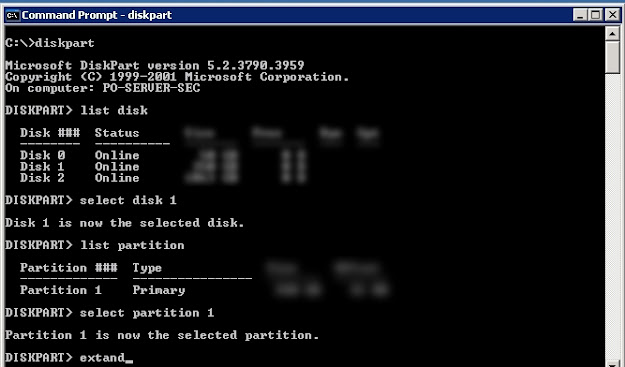
如何在Windows server 2003 下擴展(擴增)磁碟分割區容量 \ How to use diskpart.exe command extend partition size on Windows server 2003 解決方法/Solution :   使用 Windows 本身內建的程式 diskpart.exe 此工具可讓您使用命令提示字元的指令來管理,磁碟、磁碟分割或磁碟區。 Run CMD to command prompt and then type following command: diskpart DISKPART> list disk  (list your disk number) DISKPART> select disk 1  ( "disk 1" is the number of disk you want to extend) DISKPART> list  partition  DISKPART> select partition 1 ( "partition 1" is the number of partition you want to extend) DISKPART> extend  DISKPART> exit p.s. extend command without any parameter will default extend the maximum available free space to use, if you not want use all the free space you can define the size with parameter "size={number}" i.e.  extand size=20000 After finish type "exit" enter to exit diskpart. Reference: 使用diskpart來擴增磁碟分割區容量(適用於2000,xp,win2003  https://blog.xuite.net/ganpin917/home/44007001-%E4%BD%BF%E7%94%A8diskpart%E4...

Mysql 備份免輸入密碼

mysqlpump 免密碼備份 進入Mysql shell  輸入以下指令,跟著輸入密碼,就會 創建加密秘鑰。 root@localhost # mysql_config_editor  set --login-path=passkey --host=localhost --user=root --password 執行下面 備份 的 指令可以 不用輸入密碼 ,參數  "--login-path=passkey"  ,這個 “passkey” 參數 對應上面 創建的加密秘鑰 root@localhost # mysqlpump --login-path=passkey mydatabase > bak.sql