發表文章

目前顯示的是有「problem」標籤的文章

Word cannot save file to network drive with error message "Word cannot save or create this file. Make sure that the disk you want to save the file on is not full, write-protected, or damaged."

圖片
Word cannot save file to network drive with error message "Word cannot save or create this file. Make sure that the disk you want to save the file on is not full, write-protected, or damaged." Issue for Microsoft Office Word 2016 on Windows 10 Del all file under following folder: C:\Users\%username%\AppData\Local\Microsoft\Windows\INetCache\Content.MSO C:\Users\%username%\AppData\Local\Microsoft\Windows\INetCache\Content.Word Reference: Files stored in the "C:\Users\<userid>\AppData\Local\Microsoft\Windows\INetCache\Content.MSO" folder are temporary files stored by MSO (Microsoft Office) applications, including Word, Excel, PowerPoint, 

Windows 10 Fix - "We Can't Sign Into Your Account" error message

圖片
Windows 10 Fix - "We Can't Sign Into Your Account" error message When sign in Windows will get "We Can't Sign Into Your Account - this problem can often be fixed by signing out of your account and then signing back in" error message Solution:       1. Run CMD and type "whoami /user" to get your using SID         2. Run regedit go to  "HKEY_LOCAL_MACHINE\SOFTWARE\Microsoft\Windows NT\CurrentVersion\ProfileList" Select your SID and click "ProfileImagePath" change to collect path e.g. d:\users\yourname      3. Go to C:\users\yourname folder right click select properties -> Security -> Advanced -> change Owner to yourname and select "Replace all child object permission entries with inheritable permission entries from this object" -> click OK     4. Restart PC & Sign in again

OOBESETTINGS error when first time logon Windows 10 or receive “Something went wrong but you can try again." error message

  OOBESETTINGS error when first time logon Windows 10 or receive “Something went wrong but you can try again." error message. Try below step:  1. Select Ctrl+Shift+F10 on the keyboard once. 2. Select Ctrl+Shift+Esc on the keyboard to open the Task Manager In Task Manager close Windows 10 logon task process Manually run msoobe.exe by d ouble click  C:\windows\system32\oobe\ msoobe.exe than reboot Windows.

Outlook missing Teams Meeting icon

Outlook missing Teams Meeting icon Reference: https://answers.microsoft.com/en-us/outlook_com/forum/all/outlook-calendar-missing-teams-icon/827c07d5-8741-4064-8ec0-9bc065a1c604 Teams icon should be automatically added to Outlook client,  if not please try the steps below: 1. Restart the Teams desktop client. 2. Sign out and then sign back in to the Teams desktop client. 3. Restart the Outlook desktop client.  If problem persist see this one: 1. In Outlook, choose File and then Options. 2. Select the Add-ins tab of Outlook Options dialog box. 3. Confirm that Microsoft Teams Meeting Add-in for Microsoft Office is listed in the Active Application Add-ins list 4. If the Teams Meeting Add-in is listed in the Disabled Application Add-ins list, select COM Add-ins in Manage and then select Go… 5. Set the checkbox next to Microsoft Teams Meeting Add-in for Microsoft Office. 6. Choose OK on all dialog boxes and restart Outlook.

No responding when print even restart windows still have problem - How to clear print queue

Pressing the Windows logo key  + R. In the Run window, type services.msc The Services window is displayed. Right click Print Spooler and select Stop. Navigate to C:\Windows\System32\spool\PRINTERS and delete all files in the folder. In the Services window, Start the Print Spooler service or reboot Windows.  

Windows 10 突然不能夠輸入中文, 只能出英文解決辦法

 Windows 10 突然不能夠輸入中文, 只能出英文解決辦法 執行 regedit.exe 開啟【登錄編輯程式】,找 “HKEY_CURRENT_USER\Software\Microsoft\Windows\CurrentVersion\Run” 到 Run這個資料夾,在右邊欄位點選右鍵,新增字串值”ctfmon” 然後修改字串值的數值資料為 “C:\Windows\system32\ctfmon.exe” 完成後關閉 重新開機

Cannot login to Outlook OWA with "Too many redirects detected" and 500 error

Cannot login to Outlook OWA with "Too many redirects detected" and 500 error. Problem: When login to Outlook OWA will get following error message and even tried to clear browser cache, history & cookies still cannot log in Outlook OWA.  Error message: 500 Something went wrong Repeating redirects detected X-Redir-Error :xxxxxxx|xxxxxxx|xxxxxxx|xxxxxxx..." Case: It happen with browser login Outlook OWA but if use desktop app login is OK, so the problem not come from user account or Exchange server, it should come with your computer local user profile. Solved: Press "Windows Key + R", and type "%appdata%\Microsoft" Enter Once in the directory, you’ll see Outlook folder: Delete "Outlook" folder

Cannot login Microsoft Teams desktop version

Cannot login Microsoft Teams desktop version  Press "Windows Key + R", and type "%appdata%\Microsoft" press enter. Once in the directory, you’ll see Teams folder: Delete "Teams" folder

OfficeLink error - "unable to locate the necessary files to perform this officelink function"

Software: MYOB ABSS Premier ABSS PremierPlus ABSS Accounting Problem: When use above software try export file get error message:  "unable to locate the necessary files to perform this OfficeLink function". Fix: Run cmd in administrator right and go to software installed folder location following two files and run command. drvwd32.exe /register drvxl32.exe /register

在Office 文件內打印時設定不能跟從喜好設定內的設定內容 (HP Printer setting when print office file cannot follow default setting )

Problem: 在Office 文件內打印時設定不能跟從喜好設定內的設定內容 (HP Printer setting when print office file cannot follow default setting ) Solved: 打印機的名稱太長, 更改打印機去較短名稱. Printer name too lone will case this problem, change shorter printer name.  

Chrome cannot download .Exe file (Chrome block exe file download)

Chrome cannot download .Exe file (Chrome block exe file download) When click download exe file link just no happen come out & no warring message.  1.) Type  "chrome://flags/#treat-unsafe-downloads-as-active-content" link in chrome address bar and enter 2.) Enable " Treat risky downloads over insecure connections as active mixed content" 3.) Restart Chrome

Windows 7 通知區域裡部份「圖示」消失或不能顯示

圖片
 Windows 7 通知區域裡部份「圖示」消失或不能顯示 1. Run "regedit.exe"  2. Go to following key "HKEY_CURRENT_USER\Software\Classes\Local Settings\Software\Microsoft\Windows\CurrentVersion\TrayNotify" 3. Delete 「IconStreams」and 「PastIconsStream」這兩項登錄資料,刪除完之後就可以關閉登錄編輯程式。 4.  Reboot Windows or relaunch explorer.exe.

Changing Default File Associations in Windows 10

Changing Default File Associations in Windows 10 Reference : http://woshub.com/managing-default-file-associations-in-windows-10/ Edit the register with following key HKEY_CURRENT_USER\Software\Microsoft\Windows\CurrentVersion\Explorer\FileExts\.fileExtName How to Reset File Associations in Windows 10 Using the following command, you can reset the settings of file associations imported earlier: Dism.exe /Online /Remove-DefaultAppAssociations After running this command, all new users will be logged with the default file association (the reset has no effect on the existing user profiles). In order to reset the file associations manually configured by the user to the default ones, you need to click on the  Reset  button in the Settings -> Apps -> Default Applications. In this case, all file associations will return to the state of clean Windows 10 installation. Importing Default App Associations on Windows 10 The resulting XML file can be imported into a Windows 10 on other ...

Windows 10 突然無聲解決辦法 - Windows 10 no sound (Audio disabled) (no sound and speaker volume icon show disable) problem solution

Windows 10 Audio disabled (no sound and speaker volume icon show disable) problem 1.           In Device Manager from the menu. 2.           In Device Manager, expand Other Devices Intel High Definition Audio. 3.           Press View and then select Devices by connection. 4.           Expand ACPI x64-based PC. under              -   Microsoft ACPI-Compliant System                -   PCI Express Root Complex                   -   Intel(R) Smart Sound Technology (Intel(R) SST) Audio Controller  Select "Intel (R) Smart Sound Technology (Intel(R) SST)…" 5.           Right click mouse button and select Uninstall. à ...

Windows 7 開不了機藍畫面的解決辦法 / Windows 7 cannot boot show blue screen with error message "STOP 0x0000007B"

Windows 7 開不了機藍畫面的解決辦法 Windows 7 cannot boot show blue screen with error message "STOP 0x0000007B" Symptoms:  Cannot Boot to Windows(Auto reboot) show blue screen with following error message: (Blue screen with following error message)  STOP 0x0000007B INACCESSABLE_BOOT_DEVICE BSOD: 0x0000007b (0x80786B58, 0xC0000034, 0x00000000, 0x00000000) Solution: Use Windows PE bootdisk or remove hard disk and put to other PC  Edit following register key value from 3 to 0. HKEY_LOCAL_MACHINE\System\CurrentControlSet\Services\Msahci HKEY_LOCAL_MACHINE\System\CurrentControlSet\Services\IastorV HKEY_LOCAL_MACHINE\System\CurrentControlSet\Services\iaStor In the pane on the right side, right-click  Start  in the  Name  column, and then click  Modify . In the  Value data  box, type  0 , and then click  OK . On the  File  menu, click  Exit  to close Registry Editor. How to access and edit another ha...

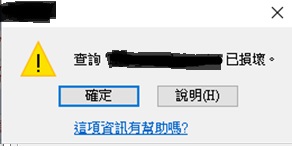
Microsoft Office Access get ‘Query is corrupted' message , error code: 2950 / 3340 , after databases Office Update . ( Access 出現查詢 己損壞錯誤信息 error code: 2950)

圖片
Microsoft Office Access get "Query" is corrupted error message after databases Office Update. ( Access 出現查詢 <name> 己損壞錯誤信息  error code: 2950 / 3340) (Error in Access 2010, 2013, and 2016) Problem: Office November 2019 Updates are causing Access Error 3340 / 2950 Solution: Go to add and remove Uninstall update "KB4484127" fixed the error. Uninstall office update step: 1. After uninstall go to "Add/Remove Programs", Click "Change or Remove Programs" 2. Click "Show Updates" 3. In right corner click search and type "KB4484127" after it show up select and uninstall it. P.S After uninstall need go to Windows Update hide the update "KB4484127" make it stop auto install backup again. If using Windows 10 you need download "wushowhide.diagcab" to make "show and hide updates" http://download.microsoft.com/download/F/2/2/F22D5FDB-59CD-4275-8C95-1BE17BF70B21/wushowhide.diagcab...

Adobe reader DC open file very slow 解決開PDF超慢問題。

Adobe reader DC open file very slow 解決開PDF超慢問題。 (轉載自: https://answers.acrobatusers.com/adobe-reader-DC-slow-q283887.aspx ) Try the following (one change at a time, so what we know what actually caused the problem when it goes away): 1.) Open Reader's preferences and go to the "General" category. Uncheck the two "Show online storage..." options. This will not connect to Adobe's "Document Cloud" when you try to open a document. 2.) Open Reader's preferences and go to the "Documents" category. Set the number of files in the recently used list to 1 (this will remove all your files that you have recently used from that list). If this fixes your problem, then there may be something wrong with one of the files that you've recently used (e.g. a network drive no longer being available). 3.) Open Reader's preferences and go to the "Security (Enhanced)" category and set "Protected View" to "Off" ...

Windows update cannot check for updates because the service is not running Windows 7 / Windows Update 不能檢查更新

Windows update cannot check for updates because the service is not running Windows 7 / Windows 7的 Windows Update 不能檢查更新 1)Remove your Windows Update history and restart the Windows Update service 2) Type services.msc and click OK. 3) Find and right-click on Windows Update and select Stop. 4) Delete under "C:\Windows\SoftwareDistribution" All subfolders. 5) Run "CMD" and Enter following commond: regsvr32 wuapi.dll regsvr32 wuaueng.dll regsvr32 wups.dll regsvr32 wups2.dll regsvr32 wuwebv.dll regsvr32 wucltux.dll 6) Find and right-click on Windows Update and select Start. 7) Restart your computer and try to perform Windows Update on your Windows to see if it works. 轉載自( https://www.drivereasy.com/knowledge/windows-update-cannot-currently-check-for-updates-solved/ )

How to Replace Motherboard without Reinstalling Windows / Fix Windows cannot boot after replace motherboard. (換底板不用從新安裝Windows)

How to Replace Motherboard without Reinstalling Windows  Windows 7 (轉載自):  https://www.wintips.org/how-to-replace-motherboard-without-re-installing-windows/ 1.Run “regedit” and press Enter. 2. Inside Windows Registry, navigate (from the left pane) to this key:  HKEY_LOCAL_MACHINE\SYSTEM\CurrentControlSet\services\msahci * Note: If you have Window 8, Windows 10 & Server 2012, then navigate to the “StorAHCI” key (e.g. : “HKEY_LOCAL_MACHINE\Repair\ControlSet001\services\storahci”) , because in these Operating Systems the MSAHCI has been replaced by StorAHCI. 3. At the right pane double click at 'Start' DWORD value and change its value data to 0 (zero). Click OK when finish. 4. Now perform the same modification to this key: HKEY_LOCAL_MACHINE\SYSTEM\CurrentControlSet\services\pciide 5. At the right pane double click at 'Start' DWORD value and change its value data to 0 (zero). Click OK when finish. 6. If you use RAID  ...

Windows Server run backup fail and prompt "Error returned while creating the volume shadow copy:8004230f" message

Windows Server run backup fail and prompt  " Error returned while creating the volume shadow copy:8004230f" message To resolve this issue, follow these steps:  Click  Start , click  Run , type  cmd , and then click  OK . Type the following commands at a command prompt. Press ENTER after you type each command. cd /d %windir%\system32 Net stop vss Net stop swprv regsvr32 ole32.dll regsvr32 oleaut32.dll regsvr32 vss_ps.dll vssvc /register regsvr32 /i swprv.dll regsvr32 /i eventcls.dll regsvr32 es.dll regsvr32 stdprov.dll regsvr32 vssui.dll regsvr32 msxml.dll regsvr32 msxml3.dll regsvr32 msxml4.dll Note  The last command may not run successfully.