發表文章

目前顯示的是有「error」標籤的文章

Install UiPath V2022.4.10 get error message "Machine-level installs are not permitted while at least one user-scoped installation exists."

圖片
Install UiPath V2022.4.10 get error message "Machine-level installs are not permitted while at least one user-scoped installation exists." Solution:  Uninstall all UiPath products and delete following registry than reinstall:  Computer\HKEY_USERS\.DEFAULT\Software\Microsoft\Installer\Products\FCC05B71CFD0BC54CBF3445157BF08F0

OOBESETTINGS error when first time logon Windows 10 or receive “Something went wrong but you can try again." error message

  OOBESETTINGS error when first time logon Windows 10 or receive “Something went wrong but you can try again." error message. Try below step:  1. Select Ctrl+Shift+F10 on the keyboard once. 2. Select Ctrl+Shift+Esc on the keyboard to open the Task Manager In Task Manager close Windows 10 logon task process Manually run msoobe.exe by d ouble click  C:\windows\system32\oobe\ msoobe.exe than reboot Windows.

Outlook missing Teams Meeting icon

Outlook missing Teams Meeting icon Reference: https://answers.microsoft.com/en-us/outlook_com/forum/all/outlook-calendar-missing-teams-icon/827c07d5-8741-4064-8ec0-9bc065a1c604 Teams icon should be automatically added to Outlook client,  if not please try the steps below: 1. Restart the Teams desktop client. 2. Sign out and then sign back in to the Teams desktop client. 3. Restart the Outlook desktop client.  If problem persist see this one: 1. In Outlook, choose File and then Options. 2. Select the Add-ins tab of Outlook Options dialog box. 3. Confirm that Microsoft Teams Meeting Add-in for Microsoft Office is listed in the Active Application Add-ins list 4. If the Teams Meeting Add-in is listed in the Disabled Application Add-ins list, select COM Add-ins in Manage and then select Go… 5. Set the checkbox next to Microsoft Teams Meeting Add-in for Microsoft Office. 6. Choose OK on all dialog boxes and restart Outlook.

Can't sign into Onedrive with error code 0x8004de40 on windows 7

Can't sign into Onedrive with error code 0x8004de40 on windows 7   When you access a Microsoft SharePoint or OneDrive website from Windows 8 or Windows 7 Service Pack 1 (SP1), you receive one of the following error messages: Error code: 0x8004de40   The remote server returned an error: (400) Bad Request The underlying connection was closed Solution: Download and install Easy fix and run: https://download.microsoft.com/download/0/6/5/0658B1A7-6D2E-474F-BC2C-D69E5B9E9A68/MicrosoftEasyFix51044.msi Reference: https://support.microsoft.com/en-us/topic/update-to-enable-tls-1-1-and-tls-1-2-as-default-secure-protocols-in-winhttp-in-windows-c4bd73d2-31d7-761e-0178-11268bb10392 https://support.microsoft.com/zh-tw/topic/%E6%9B%B4%E6%96%B0%E4%BB%A5%E5%9C%A8-windows-%E7%89%88-winhttp-%E4%B8%AD%E5%95%9F%E7%94%A8-tls-1-1-%E5%92%8C-tls-1-2-%E5%81%9A%E7%82%BA%E9%A0%90%E8%A8%AD%E5%AE%89%E5%85%A8%E9%80%9A%E8%A8%8A%E5%8D%94%E5%AE%9A-c4bd73d2-31d7-761e-0178-11268bb10392

Cannot open Powerpoint in network share drive with error message "Sorry powerpoint can't read ppt" / 網路上的Powerpoint file不能開啟,一直出現資料損毀壞要修復警告。

圖片
Cannot open Powerpoint file which store in network share drive with error message "Sorry powerpoint can't read ppt" 網路上的Powerpoint file不能開啟,一直出現資料損毀壞 要修復警告。 (轉載自) https://social.technet.microsoft.com/Forums/en-US/88abb0fb-459b-4bf5-ad3d-d9bdd7ccae22/powerpoint-2013-wont-open-network-files?forum=officeitpro   解決辦法/solving: Try disable Protected View as follow: 1. Open a PowerPoint file. 2. Click File > Options > Trust Center > Trust Center Settings. 3. Click Protected View from the left panel. 4. Clear all the three check boxes and click OK. If above doesn't work, please also try testing with a new Windows user profile.

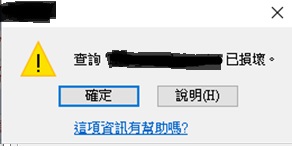
Microsoft Office Access get ‘Query is corrupted' message , error code: 2950 / 3340 , after databases Office Update . ( Access 出現查詢 己損壞錯誤信息 error code: 2950)

圖片
Microsoft Office Access get "Query" is corrupted error message after databases Office Update. ( Access 出現查詢 <name> 己損壞錯誤信息  error code: 2950 / 3340) (Error in Access 2010, 2013, and 2016) Problem: Office November 2019 Updates are causing Access Error 3340 / 2950 Solution: Go to add and remove Uninstall update "KB4484127" fixed the error. Uninstall office update step: 1. After uninstall go to "Add/Remove Programs", Click "Change or Remove Programs" 2. Click "Show Updates" 3. In right corner click search and type "KB4484127" after it show up select and uninstall it. P.S After uninstall need go to Windows Update hide the update "KB4484127" make it stop auto install backup again. If using Windows 10 you need download "wushowhide.diagcab" to make "show and hide updates" http://download.microsoft.com/download/F/2/2/F22D5FDB-59CD-4275-8C95-1BE17BF70B21/wushowhide.diagcab...

如何修復 Windows XP + Office 2010 無法找到程序輸入點 enumcalenderinfoexex(在動態連結程式庫KERNEL.32.DLL) Error

Office 2010 一 開就出現  "enumcalenderinfoexex(在動態連結程式庫KERNEL.32.DLL)" 錯誤信息 錯誤原因:因為微軟推送的 Office 更新 解決方法: 步驟 1. 到控制台,新增移除程式,右上方的 "顯示更新" 打勾。 2. 在 Office 2010 更新裡面, 跟下面KB 順着移除,不一定要全部刪除可以逐一嘗試。 3. 移除後,Office 2010 即可恢復正常運作。(留意自動更新要關閉, 或者停止自動更新該KB更新) Microsoft Office 2010 ProductKnowledge Base article title and number (KB4462223) (KB4462157) (KB4462186) (KB4018313) (KB4462174) (KB4462177) (KB4462172) (KB4462187) (KB4462182) (KB3115314) (KB4461608) (KB4092465) (KB4461607) (KB4461534) (KB4462154) (KB4461627)

Windows Server run backup fail and prompt "Error returned while creating the volume shadow copy:8004230f" message

Windows Server run backup fail and prompt  " Error returned while creating the volume shadow copy:8004230f" message To resolve this issue, follow these steps:  Click  Start , click  Run , type  cmd , and then click  OK . Type the following commands at a command prompt. Press ENTER after you type each command. cd /d %windir%\system32 Net stop vss Net stop swprv regsvr32 ole32.dll regsvr32 oleaut32.dll regsvr32 vss_ps.dll vssvc /register regsvr32 /i swprv.dll regsvr32 /i eventcls.dll regsvr32 es.dll regsvr32 stdprov.dll regsvr32 vssui.dll regsvr32 msxml.dll regsvr32 msxml3.dll regsvr32 msxml4.dll Note  The last command may not run successfully.

Windows cannot get IP address with DHCP and DHCP Client service cannot start up with "Error 5: Access is Denied" message

Windows cannot get IP address with DHCP and DHCP Client service cannot start up with "Error 5: Access is Denied" message 1.) RUN--> regedit 2.) Edit windows registry: "HKEY_LOCAL_MACHINE\SYSTEM\CurrentControlSet\Services\Dhcp" and "HKEY_LOCAL_MACHINE\SYSTEM\CurrentControlSet\Services\TcpIp" Right click it and select Permissions. Select the 'NETWORK SERVICE' and add the  Full control   Select the 'DHCP' and add the  Full control   If not find the DHCP and  NETWORK SERVICE in user list just add it to the list and change to Full control permissions. 3.) RUN command Run cmd and enter following command NET  LOCALGROUP   administrators  "NT Authority\Local Service"   /add netsh winsock reset catalog 4.) Reboot PC Done~ Reference: https://www.wintips.org/how-to-fix-dhcp-service-cannot-start-access-is-denied/

Teamviewer can't connect always prompt "no connection to teamviewer server" message

In Teamviewer go to clear selection with :  Others -> Option -> Advanced -> Advancenced Network Opts -> Use UDP (reccomended)(remove this option) 

HP DeskJet 3720 Printer 不能直接連線WiFi 打印和 WiFi Direct default password

圖片
HP DeskJet 3720 printer 不能直接連線WiFi 打印和 HP WiFi Direct 的預設密碼 password Solved 解決: HP WiFi Direct default password : 12345678 廢話: 朋友打來訴說當用手機經 wifi 直接連線(WiFi Direct)他的HP DeskJet 3700 printer去打印時, 問他要密碼, 但他没有設定密碼, 當然地說明書一早就被他丟掉了, 他都從未看過說明書內容 😔(白眼),  幫佢上去HP官網找了一遍,下載了使用手冊、指南都沒有提供相關內容, 有時最簡單最重要的偏偏就是没有, 最後經Google大神爬了一輪各大看板先找到 HP WiFi Direct default password : 12345678. 注意: HP DeskJet 3720 printer 用WiFi 連接打印有兩種方法: 1.  連接你現有Wifi 網路, 可以用HP手機app(如果PC可下載 HP PC 軟件 ) 連接你的打印機跟住輸入你WiFi 網路名稱(SSID)和密碼將它接入你現有Wifi 網路內。 2. 使用WiFi Direct 在手機內的WiFi直接連線去你的打印機, 不經其他WiFi 網路不用任何設定。當啓用printer 上的WiFi Direct (就是按下圖內2的功能鍵等燈號亮起), 然後在手機內WiFi (SSID List) 內直接選擇Printer 的名字,連上後輸入預設密碼12345678, 連上後就可以打印。 建議: 如果只想用WiFi Direct,  可以先關掉 Pinter上WiFi 功能鍵(圖內1的功能鍵), 只開啓WiFi Direct 功能鍵(圖內2的功能鍵), 這樣可以快速接上, 如果同時1和2功能鍵都開啓而你又没有設定好WiFi 設定, 那可要等上好半天才能連上WiFi Direct 。 Other link: 用PC 設定WiFi連接: https://support.hp.com/us-en/product/hp-deskjet-ink-advantage-3700-all-in-one-printer-series/894...

Windows hangs with Blue screen error with "atikmdag.sys" message

Windows hangs with Blue screen error with "atikmdag.sys" message First go to Windows safe mode (press F8 key when restart windows and select Windows safe mode) 1.) Run "services.msc" , change "Themes" service start type to "Stop". or Run "msconfig" command and disable "Themes" service Restart Windows. 2.) After restart it should be back to normal, and go to download and run "Display Driver Uninstaller (DDU)". https://www.wagnardsoft.com/ Download direct link (Display Driver Uninstaller (DDU) V17.0.9.1 ): https://www.wagnardsoft.com/DDU/download/DDU%20v17.0.9.1.exe p.s. If after stop "Themes" service restart Windows it still hangs you can download the "Display Driver Uninstaller (DDU)" on other computer, and save it to USB flash drive and run it on your Windows in "safe mode". 3.) Run "Display Driver Uninstaller" and select  " Clean and restart". after re...

Xeron 影印機 error code 「016-799」/ 異常結束 016-799 解決方法

圖片
方法一: (如果print PDF file 有問題) 係Adobe reader 列印裏面, 取消選擇 " 依PDF頁面大小選擇紙張來源 "。 方法二: https://jerry2yang.wordpress.com/2011/06/29/xeron-c4470-error-code-016-799-%E8%A7%A3%E6%B1%BA%E6%96%B9%E6%B3%95/ (轉載) 解決方法:調整Xeron事務機列印喜好設定,將紙張替換由「印表機預設值」改為「選擇接近尺寸(調整)」。

Automatic Send/Receive Not Working in Outlook

圖片
Automatic Send/Receive Not Working in Outlook 2016 Method 1: In Outlook "Sent/Receive" at the bottom of the listing you will find the option  Disable Scheduled Send/Receive. Once the option has been enabled (there is no check box next to it), your auto Send/Receive should start working again. There is no need to restart Outlook. Method2: Outlook 2010 and later versions To resolve this behavior, create a new Send/Receive group in Outlook:   Click  File , and then click  Options . Click the  Advanced  tab.  In the  Find Send and Recieve  section, click  Send/Recieve . Under  Group Name , click the group, and then click  Copy . Under  Send/Receive Group Name , type the new group name, and then click  OK . Under  Group Name , click the old group name. Under both  When Outlook is Online  and When Outlook is Offline , click to clear the check box for Include this group in Send/R...

Go to Google.com will display net::err_cert_authority_invalid error message

圖片
用Chrome去 Google.com 會出現 "net::err_cert_authority_invalid error" Solved: net::err_cert_authority_invalid 1.) 留意電腦日期與時間是否正確。 2.) 從另一部正常電腦 IE -> 一般 -> 內容 -> 憑證-> 受信任的根憑證授權單位-> Export-> "GlobalSign" cert. 。 3.)然後去有問題電腦import  cert. 選擇->受信任的根憑證授權單位->本機電腦 存放。 亦可以嘗試下面網站的方法: https://www.allinfopark.net/neterr-cert-authority-invalid