發表文章

目前顯示的是有「Office」標籤的文章

Word cannot save file to network drive with error message "Word cannot save or create this file. Make sure that the disk you want to save the file on is not full, write-protected, or damaged."

圖片
Word cannot save file to network drive with error message "Word cannot save or create this file. Make sure that the disk you want to save the file on is not full, write-protected, or damaged." Issue for Microsoft Office Word 2016 on Windows 10 Del all file under following folder: C:\Users\%username%\AppData\Local\Microsoft\Windows\INetCache\Content.MSO C:\Users\%username%\AppData\Local\Microsoft\Windows\INetCache\Content.Word Reference: Files stored in the "C:\Users\<userid>\AppData\Local\Microsoft\Windows\INetCache\Content.MSO" folder are temporary files stored by MSO (Microsoft Office) applications, including Word, Excel, PowerPoint, 
Outlook missing Teams Meeting icon

Outlook missing Teams Meeting icon Reference: https://answers.microsoft.com/en-us/outlook_com/forum/all/outlook-calendar-missing-teams-icon/827c07d5-8741-4064-8ec0-9bc065a1c604 Teams icon should be automatically added to Outlook client,  if not please try the steps below: 1. Restart the Teams desktop client. 2. Sign out and then sign back in to the Teams desktop client. 3. Restart the Outlook desktop client.  If problem persist see this one: 1. In Outlook, choose File and then Options. 2. Select the Add-ins tab of Outlook Options dialog box. 3. Confirm that Microsoft Teams Meeting Add-in for Microsoft Office is listed in the Active Application Add-ins list 4. If the Teams Meeting Add-in is listed in the Disabled Application Add-ins list, select COM Add-ins in Manage and then select Go… 5. Set the checkbox next to Microsoft Teams Meeting Add-in for Microsoft Office. 6. Choose OK on all dialog boxes and restart Outlook.

Can't sign into Onedrive with error code 0x8004de40 on windows 7

Can't sign into Onedrive with error code 0x8004de40 on windows 7   When you access a Microsoft SharePoint or OneDrive website from Windows 8 or Windows 7 Service Pack 1 (SP1), you receive one of the following error messages: Error code: 0x8004de40   The remote server returned an error: (400) Bad Request The underlying connection was closed Solution: Download and install Easy fix and run: https://download.microsoft.com/download/0/6/5/0658B1A7-6D2E-474F-BC2C-D69E5B9E9A68/MicrosoftEasyFix51044.msi Reference: https://support.microsoft.com/en-us/topic/update-to-enable-tls-1-1-and-tls-1-2-as-default-secure-protocols-in-winhttp-in-windows-c4bd73d2-31d7-761e-0178-11268bb10392 https://support.microsoft.com/zh-tw/topic/%E6%9B%B4%E6%96%B0%E4%BB%A5%E5%9C%A8-windows-%E7%89%88-winhttp-%E4%B8%AD%E5%95%9F%E7%94%A8-tls-1-1-%E5%92%8C-tls-1-2-%E5%81%9A%E7%82%BA%E9%A0%90%E8%A8%AD%E5%AE%89%E5%85%A8%E9%80%9A%E8%A8%8A%E5%8D%94%E5%AE%9A-c4bd73d2-31d7-761e-0178-11268bb10392

Cannot login to Outlook OWA with "Too many redirects detected" and 500 error

Cannot login to Outlook OWA with "Too many redirects detected" and 500 error. Problem: When login to Outlook OWA will get following error message and even tried to clear browser cache, history & cookies still cannot log in Outlook OWA.  Error message: 500 Something went wrong Repeating redirects detected X-Redir-Error :xxxxxxx|xxxxxxx|xxxxxxx|xxxxxxx..." Case: It happen with browser login Outlook OWA but if use desktop app login is OK, so the problem not come from user account or Exchange server, it should come with your computer local user profile. Solved: Press "Windows Key + R", and type "%appdata%\Microsoft" Enter Once in the directory, you’ll see Outlook folder: Delete "Outlook" folder

Excel 只保留文內特定符號或文字後的字串

Excel 只保留文內特定符號或文字後的字串 保留文內特定符號或文字 前 的字串 =LEFT(text,FIND(character,text)-1) or 保留文內特定符號或文字 後 的字串 =RIGHT(text,FIND(character,text)-1)  e.g. 文字B5, 特定符號"_" :  特定符號"_"  前 文字 =LEFT(B5,FIND("_",B5)-1) 特定符號"_" 後 文字 =RIGHT(B5,LEN(B5)-FIND("_",B5)) Reference: https://exceljet.net/formula/split-text-string-at-specific-character

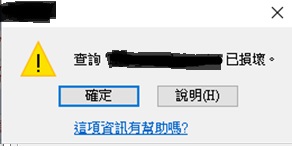
Microsoft Office Access get ‘Query is corrupted' message , error code: 2950 / 3340 , after databases Office Update . ( Access 出現查詢 己損壞錯誤信息 error code: 2950)

圖片
Microsoft Office Access get "Query" is corrupted error message after databases Office Update. ( Access 出現查詢 <name> 己損壞錯誤信息  error code: 2950 / 3340) (Error in Access 2010, 2013, and 2016) Problem: Office November 2019 Updates are causing Access Error 3340 / 2950 Solution: Go to add and remove Uninstall update "KB4484127" fixed the error. Uninstall office update step: 1. After uninstall go to "Add/Remove Programs", Click "Change or Remove Programs" 2. Click "Show Updates" 3. In right corner click search and type "KB4484127" after it show up select and uninstall it. P.S After uninstall need go to Windows Update hide the update "KB4484127" make it stop auto install backup again. If using Windows 10 you need download "wushowhide.diagcab" to make "show and hide updates" http://download.microsoft.com/download/F/2/2/F22D5FDB-59CD-4275-8C95-1BE17BF70B21/wushowhide.diagcab...

如何修復 Windows XP + Office 2010 無法找到程序輸入點 enumcalenderinfoexex(在動態連結程式庫KERNEL.32.DLL) Error

Office 2010 一 開就出現  "enumcalenderinfoexex(在動態連結程式庫KERNEL.32.DLL)" 錯誤信息 錯誤原因:因為微軟推送的 Office 更新 解決方法: 步驟 1. 到控制台,新增移除程式,右上方的 "顯示更新" 打勾。 2. 在 Office 2010 更新裡面, 跟下面KB 順着移除,不一定要全部刪除可以逐一嘗試。 3. 移除後,Office 2010 即可恢復正常運作。(留意自動更新要關閉, 或者停止自動更新該KB更新) Microsoft Office 2010 ProductKnowledge Base article title and number (KB4462223) (KB4462157) (KB4462186) (KB4018313) (KB4462174) (KB4462177) (KB4462172) (KB4462187) (KB4462182) (KB3115314) (KB4461608) (KB4092465) (KB4461607) (KB4461534) (KB4462154) (KB4461627)

Automatic Send/Receive Not Working in Outlook

圖片
Automatic Send/Receive Not Working in Outlook 2016 Method 1: In Outlook "Sent/Receive" at the bottom of the listing you will find the option  Disable Scheduled Send/Receive. Once the option has been enabled (there is no check box next to it), your auto Send/Receive should start working again. There is no need to restart Outlook. Method2: Outlook 2010 and later versions To resolve this behavior, create a new Send/Receive group in Outlook:   Click  File , and then click  Options . Click the  Advanced  tab.  In the  Find Send and Recieve  section, click  Send/Recieve . Under  Group Name , click the group, and then click  Copy . Under  Send/Receive Group Name , type the new group name, and then click  OK . Under  Group Name , click the old group name. Under both  When Outlook is Online  and When Outlook is Offline , click to clear the check box for Include this group in Send/R...

Office 美工圖案的替代選擇

新版Office 不再提供其應用程式中的美工圖案,但它可以協助您線上搜尋以在您的檔案中插入圖片。 https://support.office.com/zh-tw/article/%E5%9C%A8%E6%AA%94%E6%A1%88%E4%B8%AD%E6%96%B0%E5%A2%9E%E7%B7%9A%E4%B8%8A%E5%9C%96%E7%89%87%E6%88%96%E7%BE%8E%E5%B7%A5%E5%9C%96%E6%A1%88-0a01ae25-973c-4c2c-8eaf-8c8e1f9ab530 想使用美工圖案的使用者還可以選擇透過 Oepn Clip Art 。 https://openclipart.org/