發表文章

目前顯示的是有「Command」標籤的文章

Command line for looking at specific port

In cmd: netstat -na | find "8080" In bash: netstat -na | grep "8080" In PowerShell: netstat -na | Select-String "8080" 計算出 80 埠連線數並且連線狀態是 ESTABLISHED 的數量 netstat -ant | find ":80" | find /c "ESTABLISHED" 列出主機中有提供服務連線的 Port,不區分大小寫 netstat -ant | find / i "listening" | find /v "0.0.0.0:0" 過濾掉 UDP netstat -ant | find ":80" | find /v "UDP"

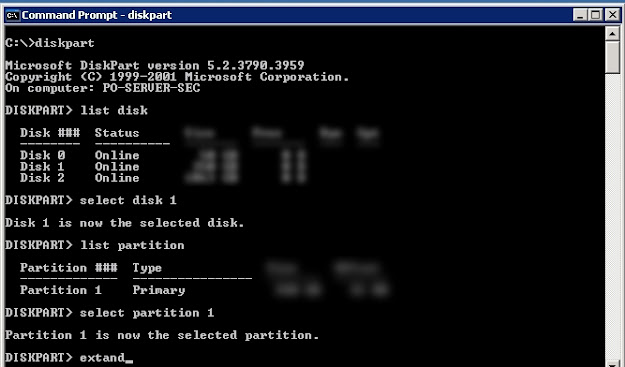
如何在Windows server 2003 下擴展(擴增)磁碟分割區容量 \ How to use diskpart.exe command extend partition size on Windows server 2003

圖片
如何在Windows server 2003 下擴展(擴增)磁碟分割區容量 \ How to use diskpart.exe command extend partition size on Windows server 2003 解決方法/Solution :   使用 Windows 本身內建的程式 diskpart.exe 此工具可讓您使用命令提示字元的指令來管理,磁碟、磁碟分割或磁碟區。 Run CMD to command prompt and then type following command: diskpart DISKPART> list disk  (list your disk number) DISKPART> select disk 1  ( "disk 1" is the number of disk you want to extend) DISKPART> list  partition  DISKPART> select partition 1 ( "partition 1" is the number of partition you want to extend) DISKPART> extend  DISKPART> exit p.s. extend command without any parameter will default extend the maximum available free space to use, if you not want use all the free space you can define the size with parameter "size={number}" i.e.  extand size=20000 After finish type "exit" enter to exit diskpart. Reference: 使用diskpart來擴增磁碟分割區容量(適用於2000,xp,win2003  https://blog.xuite.net/ganpin917/home/44007001-%E4%BD%BF%E7%94%A8diskpart%E4...
使用Net指令處理使用者與群組

使用Net指令處理使用者與群組 net user #查詢本機中所有使用者 net localgroup #查詢本機中所有群組 net user user1 123456 /add #新增使用者user1 密碼123456 net user user2 * /add #新增使用者user2 密碼* #這個意思是新增使用者user3之後在另外輸入密碼,但密碼不會顯示在螢幕。 net user user1 password 12345/add #修改使用者密碼 net user user1 /del #刪除使用者 net localgroup group1 /add #新增群組 net localgroup group1 /del #刪除群組 net localgroup group1 user1 /add #新增使用者到群組 net localgroup group1 user1 /del #刪除群組中的使用者

Windows常用命令集(cmd) (轉載自James LAB)

Windows常用命令集(cmd) (轉載自 James LAB ) 查詢系統資訊 systeminfo 查詢遠端電腦系統資訊 systeminfo /s {Remote IP} 查詢網路卡實體位址 getmac 查詢遠端電腦網路卡實體位址 getmac /s {Remote IP} 查詢已安裝驅動程式 driverquery 列出目前工作項目 tasklist 中止運行中的工作 taskkill /PID 電腦管理 compmgmt.msc 本機使用者與群組 lusrmgr.msc 使用者帳戶控制 (UAC) control nusrmgr.cpl or control userpasswords 使用者帳戶 ( 自動登入 ) control userpasswords2 or netplwiz 控制台 control 系統管理工具 control admintools 資料夾選項 sontrol folders 工作排程器 control schedtasks 印表機 control printers 系統內容 sysdm.cpl 防火牆設定 firewall.cpl 螢幕解析度 desk.cpl 電源選項 powercfg.cpl 網路連線 ncpa.cpl 小畫家 mspaint Power Shell powershell Windows Updte wuapp 網路裝置設定 netsh

How to copy all files not include directories to specify the directory (Command)

How to copy all (only)files not include directories In CMD use following command : for /r %f in (*) do @copy "%f" target e.g. want copy all file under c:\test to c:\temp cd\test for /r %f in (*) do @copy "%f" c:\temp p.s. There are spec between in" "(*)" " do .  Within the loop it just copy file into a specified folder(target) "for /r" will walk a directory tree recursively, looking for file names matching the given pattern. Specify the directory to start : for /r FolderA %f in (*) do @copy "%f" target