發表文章

目前顯示的是有「chrome」標籤的文章

Chrome cannot download .Exe file (Chrome block exe file download)

Chrome cannot download .Exe file (Chrome block exe file download) When click download exe file link just no happen come out & no warring message.  1.) Type  "chrome://flags/#treat-unsafe-downloads-as-active-content" link in chrome address bar and enter 2.) Enable " Treat risky downloads over insecure connections as active mixed content" 3.) Restart Chrome
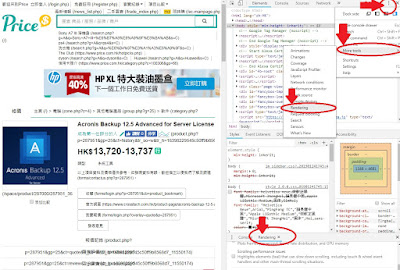
當用Chrome列印網頁時出現連結文字, 消除這些文字做到所見即所得。

圖片
當用Chrome列印網頁時出現連結文字, 消除這些文字做到列印所見即所得。 Open the Developer Tools (Windows: keyboard F12 key)  or Ctrl+Shift+I, (Mac): Cmd+Opt+I. Click the menu button and choose More tools > Rendering  Check the Emulate CSS media "print" media at the Rendering tab and select the "Screen" media type. Now you can print WYSIWYG.

Go to Google.com will display net::err_cert_authority_invalid error message

圖片
用Chrome去 Google.com 會出現 "net::err_cert_authority_invalid error" Solved: net::err_cert_authority_invalid 1.) 留意電腦日期與時間是否正確。 2.) 從另一部正常電腦 IE -> 一般 -> 內容 -> 憑證-> 受信任的根憑證授權單位-> Export-> "GlobalSign" cert. 。 3.)然後去有問題電腦import  cert. 選擇->受信任的根憑證授權單位->本機電腦 存放。 亦可以嘗試下面網站的方法: https://www.allinfopark.net/neterr-cert-authority-invalid