發表文章

解決windows 10 無法連線smb1 問題 (轉載)

圖片
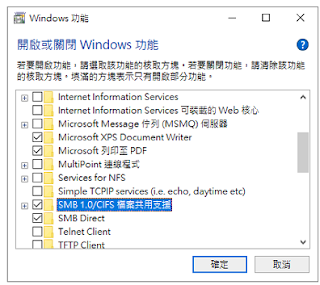
解決windows 10 無法連線smb1 問題 (轉載) (轉載自) https://helloworld.pixnet.net/blog/post/46536909-%E8%A7%A3%E6%B1%BA-windows-10-%E7%84%A1%E6%B3%95%E9%80%A3%E7%B7%9A-smb1-%E5%95%8F%E9%A1%8C 出現以下的錯誤訊息: "因為檔案共用不安全,所以無法連線。此共用需要過時的 SMB1 通訊協定,而這個通訊協定既不安全,而且可能使您的系統容易受到攻擊 您的系統需要 SMB2 或是更高版本" 解決方式 在控制台中找到 "開啟或關閉 Windows 功能"  或是 windows 鍵 + R ,輸入 optionalfeatures 並執行 找到 SMB1 相關的選項,全部勾選,並重開機即可

Windows Registry Recovery When Your Computer Won’t Boot

Windows can't boot and get following error message  Windows XP could not start because the following file is missing or corrupt: \WINDOWS\SYSTEM32\CONFIG\SYSTEM Windows XP could not start because the following file is missing or corrupt: \WINDOWS\SYSTEM32\CONFIG\SOFTWARE Stop: c0000218 {Registry File Failure} The registry cannot load the hive (file): \SystemRoot\System32\Config\SOFTWARE or its log or alternate  System error: Lsass.exe When trying to update a password the return status indicates that the value provided as the current password is not correct. You can following method to restore windows registry Windows 7/Windows XP Method 1: Boot to  command prompt or Windows PE Rename following file: ren c:\windows\system32\config\system c:\windows\tmp\system.bak ren  c:\windows\system32\config\software c:\windows\tmp\software.bak ren  c:\windows\system32\config\sam c:\windows\tmp\sam.bak ren  c:\windows\system32\config\secur...

Windows 7 開不了機藍畫面的解決辦法 / Windows 7 cannot boot show blue screen with error message "STOP 0x0000007B"

Windows 7 開不了機藍畫面的解決辦法 Windows 7 cannot boot show blue screen with error message "STOP 0x0000007B" Symptoms:  Cannot Boot to Windows(Auto reboot) show blue screen with following error message: (Blue screen with following error message)  STOP 0x0000007B INACCESSABLE_BOOT_DEVICE BSOD: 0x0000007b (0x80786B58, 0xC0000034, 0x00000000, 0x00000000) Solution: Use Windows PE bootdisk or remove hard disk and put to other PC  Edit following register key value from 3 to 0. HKEY_LOCAL_MACHINE\System\CurrentControlSet\Services\Msahci HKEY_LOCAL_MACHINE\System\CurrentControlSet\Services\IastorV HKEY_LOCAL_MACHINE\System\CurrentControlSet\Services\iaStor In the pane on the right side, right-click  Start  in the  Name  column, and then click  Modify . In the  Value data  box, type  0 , and then click  OK . On the  File  menu, click  Exit  to close Registry Editor. How to access and edit another ha...
好用的免費Clone OS 軟件

 EaseUS Todo Backup One-click backup, instant recovery. https://www.easeus.com/backup-software/tb-free.html Macrium Reflect 7 Create images of a live/running Windows OS. https://www.macrium.com/reflectfree

Facebook 專頁課程

Facebook 專頁課程 https://www.facebook.com/business/learn

進入 Computer Management 加使用者權限不需登出原有account

進入 Computer Management 加使用者權限不需登出 Click "Run" from Start menu. or press the shortcut key [Windows]+[R] and press enter. 係執行輸入幾下指令: 1.) runas /user:administrator cmd Enter the password for administrator 2.) type "compmgmt.msc" enter you can now enter Computer Management with admin user with out log out current account.

Microsoft Office Access get ‘Query is corrupted' message , error code: 2950 / 3340 , after databases Office Update . ( Access 出現查詢 己損壞錯誤信息 error code: 2950)

圖片
Microsoft Office Access get "Query" is corrupted error message after databases Office Update. ( Access 出現查詢 <name> 己損壞錯誤信息  error code: 2950 / 3340) (Error in Access 2010, 2013, and 2016) Problem: Office November 2019 Updates are causing Access Error 3340 / 2950 Solution: Go to add and remove Uninstall update "KB4484127" fixed the error. Uninstall office update step: 1. After uninstall go to "Add/Remove Programs", Click "Change or Remove Programs" 2. Click "Show Updates" 3. In right corner click search and type "KB4484127" after it show up select and uninstall it. P.S After uninstall need go to Windows Update hide the update "KB4484127" make it stop auto install backup again. If using Windows 10 you need download "wushowhide.diagcab" to make "show and hide updates" http://download.microsoft.com/download/F/2/2/F22D5FDB-59CD-4275-8C95-1BE17BF70B21/wushowhide.diagcab...